
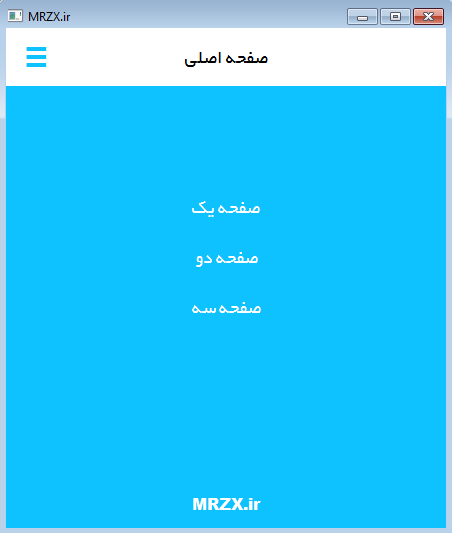
ساخت منو شبیه اندروید در کیوتی
در این مقاله یک ui برای یک نرم افزار در محیط کیوت طراحی می کنیم که کلید منو شبیه به کلید های منو در نرم افزار های اندروید دارد .
مقدمه :
در این پروژهکار با کلاس های QWidget ,QPushButton و مفاهیم اشاره گر در سی پلاس پلاس سرو کار دارید. و هدف آن این است که در یک نرم افزار که شامل چندین صفحه از نوع QWidget می باشد را بسازیم، طوری که کاربر بتواند به راحتی بین این صفحات جابجا شود.
یک پروژه از نوع QMainWindow به نام myMenu بسازید .و سپس وارد محیط راحی فرم شوید و اندازه آن را 440 در 500 پیکسل بگذارید.( دقت نمایید که تمامی منو بار ها و لیبل ها و… را از روی این ویجدت پاک کنید).
طراحی رابط کاربری :
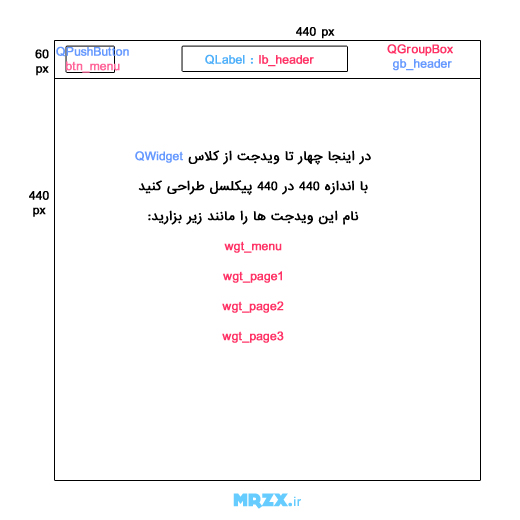
قرار است یک فرم مانند بالا طراحی کنیم که هنگامی ک کاربر بروی کلید btn_menu کلیک کرد ویدجت wgt_menu نمایش داده شود و در این ویجدت 3 کلید برای رفتن (نمایش دادن) صفحات دیگر این برنامه باشد .
دقت نمایید چهار صفحه ای که به عنوان منو وصفخات برنامه ایجاد شده اند مکان و اندازه همگی برابر باشد در اینجا نقطه شروه 0در 60 و انداره آن ها 440 در 440 پیکسل می باشد. و در درون ویدجت wgt_menu سه کلید به نام های btn_page1,btn_page2,btn_page3 قرار دهید .
همچنین در سایر صفخات برای نمونه یک لیبل با محتوای صفحه شماره 1 یا 2یا 3 قرار دهید.
برای کلید منو از کاراکتر ≡ استفاده کنید.
کد استایل شیت مربوط به QmainWindow یا همان استایل کلی برنامه مانند زیر می باشد.
QWidget{font: 14pt "B Yekan";
}QWidget#centralWidget{background:white;}
QWidget#wgt_menu{background:#0ec2ff;}
QWidget#wgt_page1{background:#fa5e33;}
QWidget#wgt_page2{background:#fa55fa;}
QWidget#wgt_page3{background:#33ff0e;}
QGroupBox{background:transparent;border:0px;border-bottom:2px solid #0ec2ff;}
#wgt_menu QPushButton{background:rgba(0,0,0,0);color:white;border:0px;}
#wgt_menu QPushButton:hover{border-bottom:2px solid white;}
#gb_header QPushButton{color:#0ec2ff;font-size:24pt;font-weight:bold;background:rgba(0,0,0,0);border:0px;}
#gb_header QPushButton:hover{color:white;font-size:24pt;font-weight:bold;background:#0ec2ff;border:0px;}
</code>
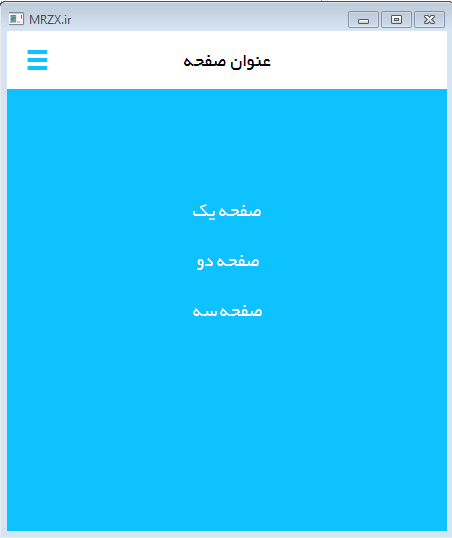
اگر برنامه را اجرا کنیم باید با تصویر زیر مواجه شویم (دقت نمایید قبل از اجرا بر ویدجت wgt_menu راست کلیک کرده و گزینه bring to front را انتخاب کنید.) :
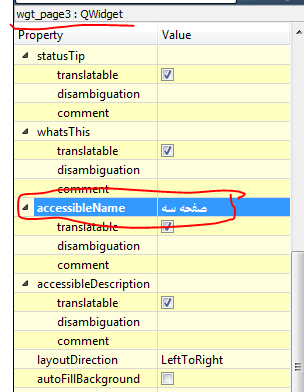
در این چهار ویدجتی که ساخته ایم مقدار صفت (property ) accessibleName را مانند تصویر زیر که برای wgt_page3 است تنظیم کنید. از این صفت برای قرار دادن در عنوان صفحه استقاده می کنیم.
برنامه نویسی :
همانطور که در آموزش های مربوط به signal,slot گفته شد برای هر رویدادی مانند کلیک کردن موس روی کلید یک slot یا همان متد در نظر بگیریم و از طریق تابع connect این سیگنال و اسلات را به هم وصل کنیم.
در این پروژه یک متد به نام setWidet(QWidget *wgt) پیاده سازی می کنیم در واقع این متد برای جابجایی بین صفحات و اینکه در حال حاضر چ ویدجتی باید نمایش داده شود یک اشاره گر به ویدجت مربوطه به این متد پاس داده و از آن استفاده می کنیم.
در کلاس QWidget یک متد به نام raise() وجود دارد که این متد همان عمل bring to front که قبلا در محیط گرافیکی انجام داده ایم را انجام می دهد.
setWidget(QWidget * wgt)
void MainWindow::setWidget(QWidget *wgt)
{wgt->raise();
ui->lb_header->setText(wgt->accessibleName());
if(wgt != ui->wgt_menu)
currWgt=wgt;
}
همانطور که می بینید برای تنظیم text لیبل عنوان صفحه یا همان شی lb_header از متد accessibleName() کلاس Qwidget استفاده شده. همچنین در این پروژه هنگامی که یک صفحه انتخاب شد اگر آن صفحه wgt_menu نبود مقدارش را درون currWgt ذخیره میکنیم. این متغییر هنگامی کاربرد دارد که شما در ضفحه اصلی هستید و دوباره روی کلید کنو کلیک می کنید باید صفحه ای که قبلا نمایش داده میشد را نمایش دهیم.
void MainWindow::btn_menu()
{if(ui->lb_header->text() != ui->wgt_menu->accessibleName())
setWidget(ui->wgt_menu);
else if(currWgt!=NULL)
setWidget(currWgt);
}
سورس کامل برنامه :
mainwindow.h
#ifndef MAINWINDOW_H#define MAINWINDOW_H#include <QMainWindow>namespace Ui {
class MainWindow;
}class MainWindow : public QMainWindow
{Q_OBJECTpublic:
explicit MainWindow(QWidget *parent = 0);
~MainWindow();
void setWidget(QWidget *wgt);
private:
Ui::MainWindow *ui;
QWidget *currWgt;
private slots:
void btn_menu();
void btn_pg1();
void btn_pg2();
void btn_pg3();
};
#endif // MAINWINDOW_H
mainwindow.cpp
#include "mainwindow.h"#include "ui_mainwindow.h"MainWindow::MainWindow(QWidget *parent) :
QMainWindow(parent),
ui(new Ui::MainWindow)
{ui->setupUi(this);
connect(ui->btn_menu,SIGNAL(clicked(bool)),this,SLOT(btn_menu()));
connect(ui->btn_pg1,SIGNAL(clicked(bool)),this,SLOT(btn_pg1()));
connect(ui->btn_pg2,SIGNAL(clicked(bool)),this,SLOT(btn_pg2()));
connect(ui->btn_pg3,SIGNAL(clicked(bool)),this,SLOT(btn_pg3()));
currWgt=NULL;
setWidget(ui->wgt_menu);
}MainWindow::~MainWindow()
{delete ui;
}void MainWindow::setWidget(QWidget *wgt)
{wgt->raise();
ui->lb_header->setText(wgt->accessibleName());
if(wgt != ui->wgt_menu)
currWgt=wgt;
}void MainWindow::btn_menu()
{if(ui->lb_header->text() != ui->wgt_menu->accessibleName())
setWidget(ui->wgt_menu);
else if(currWgt!=NULL)
setWidget(currWgt);
}void MainWindow::btn_pg1()
{setWidget(ui->wgt_page1);
}void MainWindow::btn_pg2()
{setWidget(ui->wgt_page2);
}void MainWindow::btn_pg3()
{setWidget(ui->wgt_page3);
}
mainwindow.ui کد رابط کاربری
<?xml version="1.0" encoding="UTF-8"?><ui version="4.0"><class>MainWindow</class>
<widget class="QMainWindow" name="MainWindow"><property name="geometry"><rect><x>0</x>
<y>0</y>
<width>440</width>
<height>500</height>
</rect></property><property name="windowTitle"><string>MRZX.ir</string>
</property><property name="styleSheet"><string notr="true">QWidget{font: 14pt "B Yekan";
}
QWidget#centralWidget{background:white;}QWidget#wgt_menu{background:#0ec2ff;}QWidget#wgt_page1{background:#fa5e33;}QWidget#wgt_page2{background:#fa55fa;}QWidget#wgt_page3{background:#33ff0e;}QGroupBox{background:transparent;border:0px;border-bottom:2px solid #0ec2ff;}#wgt_menu QPushButton{background:rgba(0,0,0,0);color:white;border:0px;}#wgt_menu QPushButton:hover{border-bottom:2px solid white;}#gb_header QPushButton{color:#0ec2ff;font-size:24pt;font-weight:bold;background:rgba(0,0,0,0);border:0px;}#gb_header QPushButton:hover{color:white;font-size:24pt;font-weight:bold;background:#0ec2ff;border:0px;}</string></property><widget class="QWidget" name="centralWidget"><widget class="QGroupBox" name="gb_header"><property name="geometry"><rect><x>0</x>
<y>0</y>
<width>441</width>
<height>60</height>
</rect></property><property name="title"><string/></property><widget class="QLabel" name="lb_header"><property name="geometry"><rect><x>80</x>
<y>10</y>
<width>281</width>
<height>40</height>
</rect></property><property name="text"><string>عنوان صفحه</string>
</property><property name="alignment"><set>Qt::AlignCenter</set>
</property></widget><widget class="QPushButton" name="btn_menu"><property name="geometry"><rect><x>0</x>
<y>0</y>
<width>61</width>
<height>61</height>
</rect></property><property name="cursor"><cursorShape>PointingHandCursor</cursorShape>
</property><property name="styleSheet"><string notr="true"/></property><property name="text"><string>≡</string>
</property></widget></widget><widget class="QWidget" name="wgt_menu" native="true"><property name="geometry"><rect><x>0</x>
<y>60</y>
<width>440</width>
<height>440</height>
</rect></property><property name="accessibleName"><string>صفحه اصلی</string>
</property><widget class="QPushButton" name="btn_pg1"><property name="geometry"><rect><x>150</x>
<y>100</y>
<width>141</width>
<height>41</height>
</rect></property><property name="cursor"><cursorShape>PointingHandCursor</cursorShape>
</property><property name="text"><string>صفحه یک</string>
</property></widget><widget class="QPushButton" name="btn_pg2"><property name="geometry"><rect><x>150</x>
<y>150</y>
<width>141</width>
<height>41</height>
</rect></property><property name="cursor"><cursorShape>PointingHandCursor</cursorShape>
</property><property name="text"><string>صفحه دو</string>
</property></widget><widget class="QPushButton" name="btn_pg3"><property name="geometry"><rect><x>150</x>
<y>200</y>
<width>141</width>
<height>41</height>
</rect></property><property name="cursor"><cursorShape>PointingHandCursor</cursorShape>
</property><property name="text"><string>صفحه سه</string>
</property></widget><widget class="QLabel" name="label_4"><property name="geometry"><rect><x>160</x>
<y>400</y>
<width>121</width>
<height>31</height>
</rect></property><property name="styleSheet"><string notr="true">font:12pt "Arial Black";color:white;</string></property><property name="text"><string>MRZX.ir</string>
</property><property name="alignment"><set>Qt::AlignCenter</set>
</property></widget></widget><widget class="QWidget" name="wgt_page1" native="true"><property name="geometry"><rect><x>0</x>
<y>60</y>
<width>440</width>
<height>440</height>
</rect></property><property name="accessibleName"><string>صفحه یک</string>
</property><widget class="QLabel" name="label"><property name="geometry"><rect><x>110</x>
<y>150</y>
<width>211</width>
<height>121</height>
</rect></property><property name="text"><string>صفحه یک</string>
</property><property name="alignment"><set>Qt::AlignCenter</set>
</property></widget></widget><widget class="QWidget" name="wgt_page2" native="true"><property name="geometry"><rect><x>0</x>
<y>60</y>
<width>440</width>
<height>440</height>
</rect></property><property name="accessibleName"><string>صفحه دو</string>
</property><widget class="QLabel" name="label_2"><property name="geometry"><rect><x>110</x>
<y>150</y>
<width>211</width>
<height>121</height>
</rect></property><property name="text"><string>صفحه دو</string>
</property><property name="alignment"><set>Qt::AlignCenter</set>
</property></widget></widget><widget class="QWidget" name="wgt_page3" native="true"><property name="geometry"><rect><x>0</x>
<y>60</y>
<width>440</width>
<height>440</height>
</rect></property><property name="accessibleName"><string>صفحه سه</string>
</property><widget class="QLabel" name="label_3"><property name="geometry"><rect><x>110</x>
<y>150</y>
<width>211</width>
<height>121</height>
</rect></property><property name="text"><string>صفحه سه</string>
</property><property name="alignment"><set>Qt::AlignCenter</set>
</property></widget></widget><zorder>gb_header</zorder>
<zorder>wgt_page1</zorder>
<zorder>wgt_page3</zorder>
<zorder>wgt_page2</zorder>
<zorder>wgt_menu</zorder>
</widget></widget><layoutdefault spacing="6" margin="11"/><resources/><connections/></ui>
نظر/ سوال ؟
دیدگاهتان را بنویسید